Open the Lab from the main menu
Look for Lab beside the Pokédex and other menu options. Its subtitle displays your Stardust balance. Inside, Upgrades shows permanent stat improvements and run tools; Items opens the item pool and discovery catalog.
The header says to spend Stardust here. This is distinct from the PokéDollars displayed during a run. We inspected the Lab with a zero-Stardust guest account, so the amounts below are displayed prices, not a purchase test or a measured farming rate.
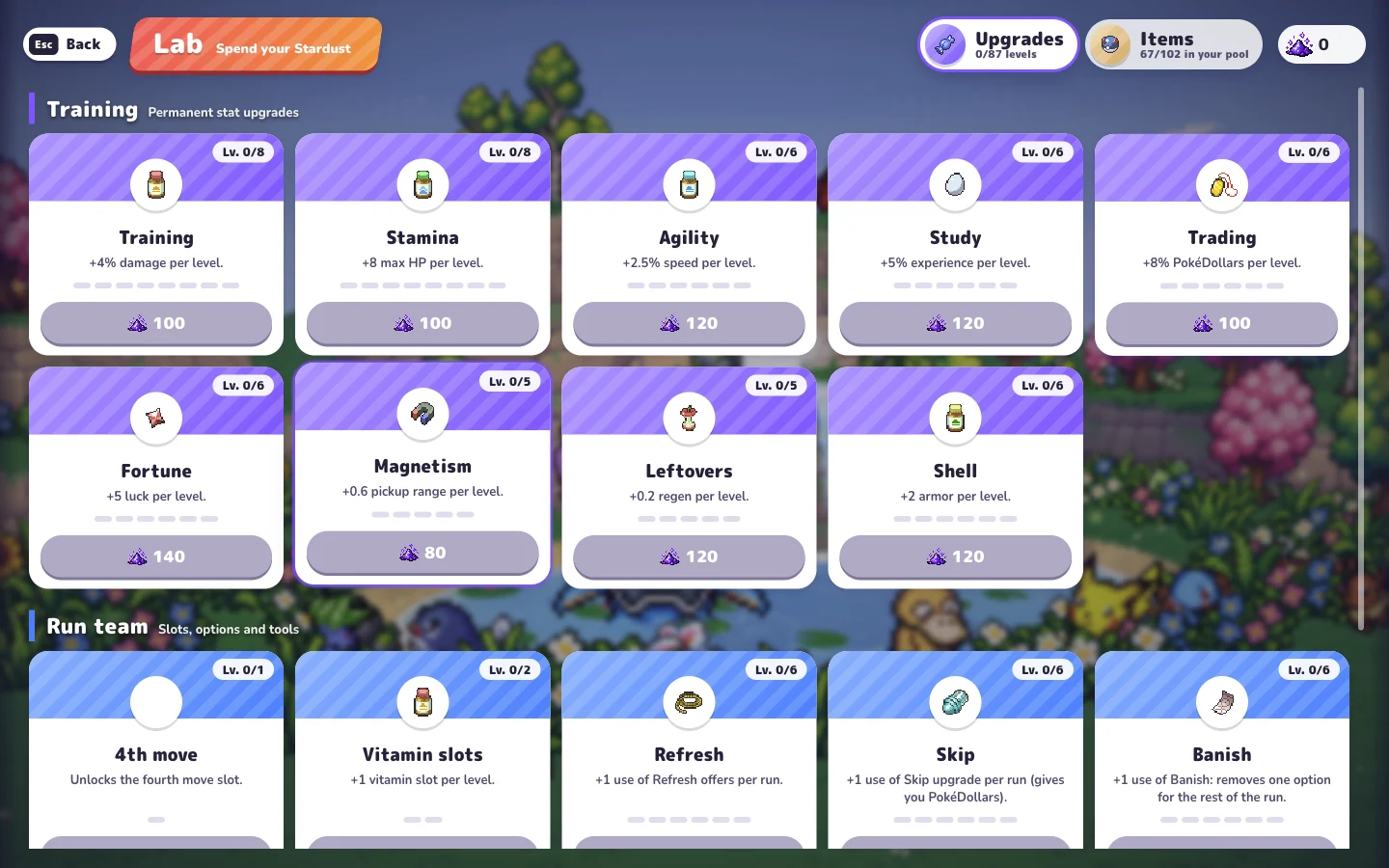
Permanent stat upgrades
These cards sit under the Lab's Training heading. The effect column describes one upgrade level. The level cap is the denominator on the card, such as 0/8; the price is what that untouched card showed in our session.
| Upgrade | Effect per level | Level cap | First cost (Stardust) |
|---|---|---|---|
| Training | +4% damage | 8 | 100 |
| Stamina | +8 maximum HP | 8 | 100 |
| Agility | +2.5% movement speed | 6 | 120 |
| Study | +5% experience | 6 | 120 |
| Trading | +8% PokéDollars | 6 | 100 |
| Fortune | +5 luck | 6 | 140 |
| Magnetism | +0.6 pickup range | 5 | 80 |
| Leftovers | +0.2 regeneration | 5 | 120 |
| Shell | +2 armor | 6 | 120 |
These bonuses address different needs. Stamina describes maximum health, Shell describes armor, and Leftovers describes regeneration. Study and Magnetism also have different jobs: experience gain and pickup reach. The names alone are not enough to compare them.
Move slots, vitamin slots, and offer tools
The Run team group includes upgrades that alter choices and capacity. A fourth move slot and a fourth level-up option are separate upgrades. The first gives room for another attack; the second changes how many cards appear when you choose an upgrade.
| Upgrade | Listed function | Level cap | First cost (Stardust) |
|---|---|---|---|
| 4th move | Opens the fourth move slot | 1 | 1,500 |
| Vitamin slots | One extra vitamin slot per level | 2 | 1,200 |
| Refresh | One more offer refresh per run, per level | 6 | 120 |
| Skip | One more upgrade skip per run, per level; gives PokéDollars | 6 | 80 |
| Banish | One more use per level to remove an option for the rest of the run | 6 | 150 |
| Fourth option | Four choices on level-up screens | 1 | 3,000 |
| Revive | Begins a run with a Max Revive | 1 | 5,000 |
| Research | +25% research progress per level | 4 | 250 |
| Support team | Raises captured Alpha slots from two to three | 1 | 3,500 |
| Archive | Three more Archive slots per level | 3 | 800 |
Refresh, Skip, and Banish also solve different problems. Refresh gives another use of the offer-refresh tool. Skip gives another use of skipping an upgrade and awards PokéDollars. Banish removes an option for the remainder of that run. Read the current prompt before spending a use.
The Lab's Revive card names a Max Revive. In the Items catalog, that item describes a revival with 60% HP. We have not bought this upgrade or triggered its revival in play, so the table reports what the game promises rather than a completed test.
Item discovery and the Archive
Switch to Items to inspect named item effects and the separate discovery section. Locked entries in our guest session displayed “???” with objectives such as playing more runs or reaching a level. Their hidden names cannot be safely inferred from the objective.
The Archive upgrade adds three slots per level. Its description says archived items stop appearing in item Poké Balls and Meowth's shop. That makes it a way to shape the available pool. We have verified the description, but have not tested archiving or restoring an item after purchase.
The item reference explains rarity, selected effects, stack limits, and the difference between items, vitamins, and move upgrades.
Plan around the problem you are encountering
After a run, identify what you want to change before spending. If a setup needs a fourth attack, inspect the move-slot card. If you want more control over level-up choices, compare the offer tools. If you are struggling with survivability, distinguish health, armor, and regeneration rather than treating every defensive upgrade as identical.
This is a decision framework based on the displayed functions, not an optimal purchase order. We have not compared clear rates, later upgrade costs, refund behavior, or the time needed to earn each amount of Stardust. Check your own current card price before confirming a purchase.
Keep a note of the game's version when following an upgrade plan. During this beta, release notes can change the assumptions behind an older build or progression recommendation.
Sources and verification
Checked on . We inspected both Lab tabs in a guest session with no upgrades purchased, using the original game's English interface in v0.5.5. Costs below are the first-level prices displayed in that session. Purchases, later prices, reward rates, and persistence across devices have not been tested.